STH client

STC logo

You can now try our STC application directly from this website!

Explore the application’s core features and interfaces in our demo. You can try the full functionality of STC, but instead of receiving messages from integrated systems, the demo lets you send messages manually. A dedicated interface allows you to upload message content from a file or enter it manually, then send it to your chosen recipient.

How do I use the demo?

We provide preconfigured user accounts for both roles: broker and institutional investor. Sign in with these accounts to explore how the system works from both perspectives. The demo includes three companies, each with a standard user account and an administrator account with elevated permissions. We recommend using the administrator accounts to try the application.

Feel free to use these accounts to explore the system. The demo sign-in links on the login pages let you sign in as your chosen user with a single click.

Try sending a message, step by step!

  1. Use the link above to sign in with Batman’s administrator account.
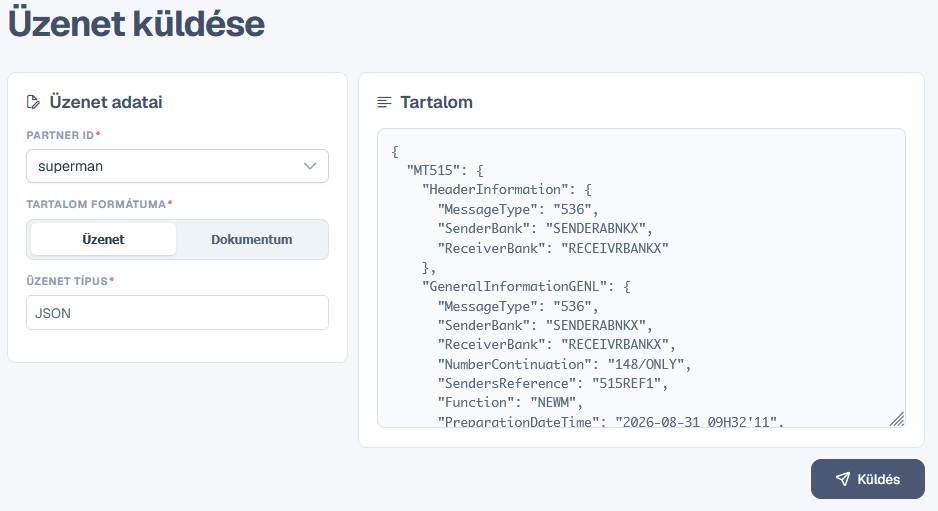
  2. Select “Send new message” from the menu.
  3. Choose a partner, such as Superman.
  4. Select “Message” as the content format.
  5. You can enter any value in the message type and payload type fields.
  6. In the content field on the right, enter valid XML (for example: <proba>Hello world!</proba>) or JSON (for example: {"proba": "Hello world!"}).
  7. Send the message.
  8. Use the link above to sign in with Superman’s administrator account.
  9. Open “Messages” and find the message you just sent. In the demo, messages arrive with a 10-second delay.
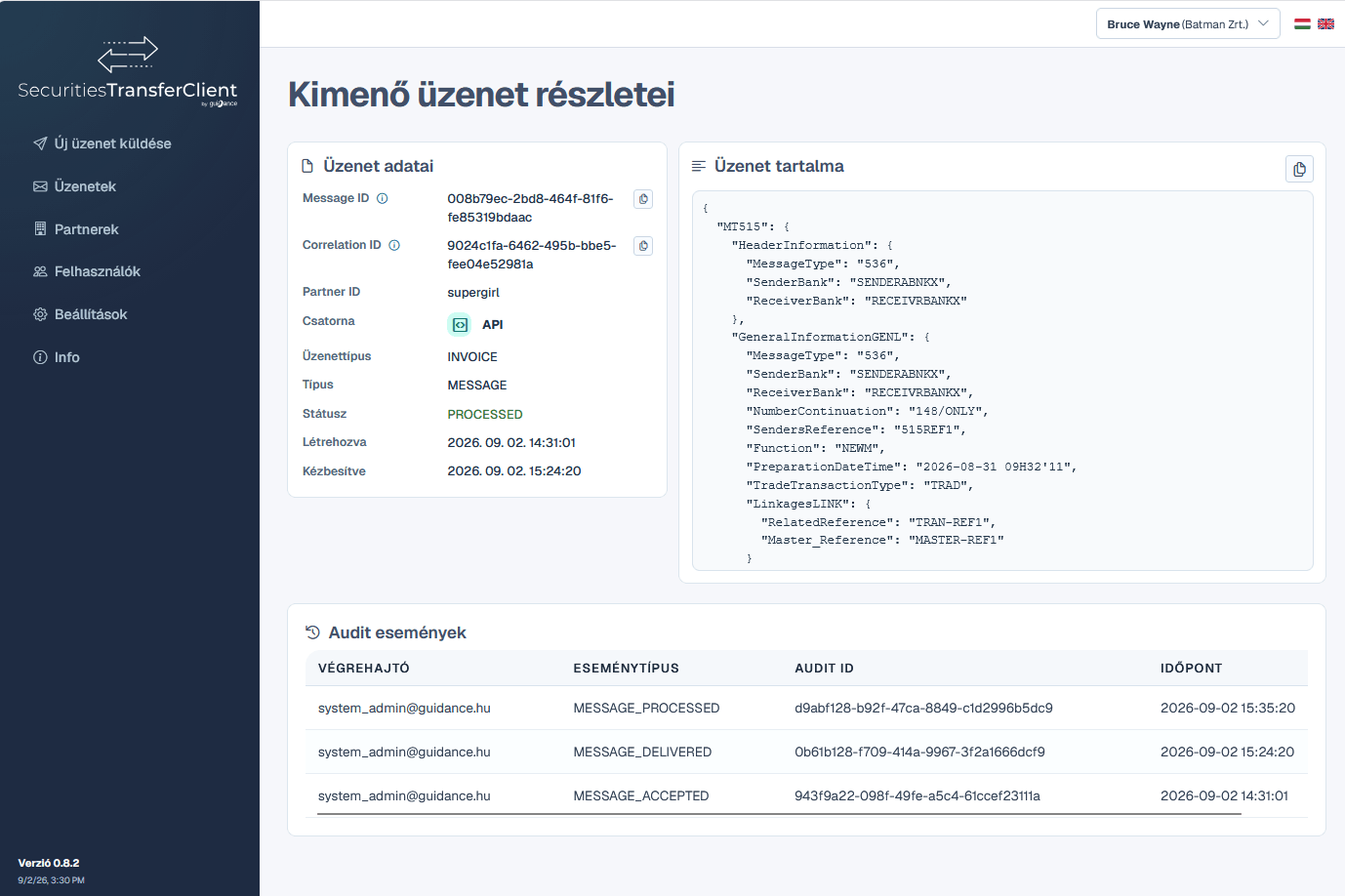
  10. Click the icon at the end of the message row to open its details.
  11. Use one of the buttons at the top of the details page to send a response indicating whether the message was processed successfully.
  12. Switch back to Batman’s account and open the sent message’s details. You can see the status change and the response there.
  13. Messages sent in the demo actually pass through the STH server. To verify this:
    1. Open the STH Admin page.
    2. Use the demo sign-in links to sign in to Batman’s account.
    3. Open “Messages” to view the message traffic passing through the STH server.

The manual messaging feature shown here is primarily intended for trying out the application, but it is also available in production. In production, messages are delivered automatically from the integrated systems to the recipient systems, with no manual steps required.
Some STC functions are not available in the demo version, such as modifying users and partners!
STC – the STH client

STC - The STH Client

The simplest way to integrate with STH

What is STC?

SecuritiesTransferClient (STC) is an easy-to-deploy client application that provides complete STH integration. It runs within the customer's own infrastructure and handles a significant part of the technical tasks required to use STH.

What does it provide?

  • Complete STH integration
  • mTLS authentication
  • Message encryption and digital signing
  • Informative web-based user interfaces
  • Controlled message types
  • Validated messages
  • Message lifecycle tracking
  • Reports and alerts
  • Support for SFTP and other communication channels

Message sending without internal integration

Messages can also be sent directly from the STC user interface, allowing STH to be used even without integration with internal systems.

System architecture

Architecture

Modular, secure and easy-to-integrate architecture
STC architecture

STC architecture

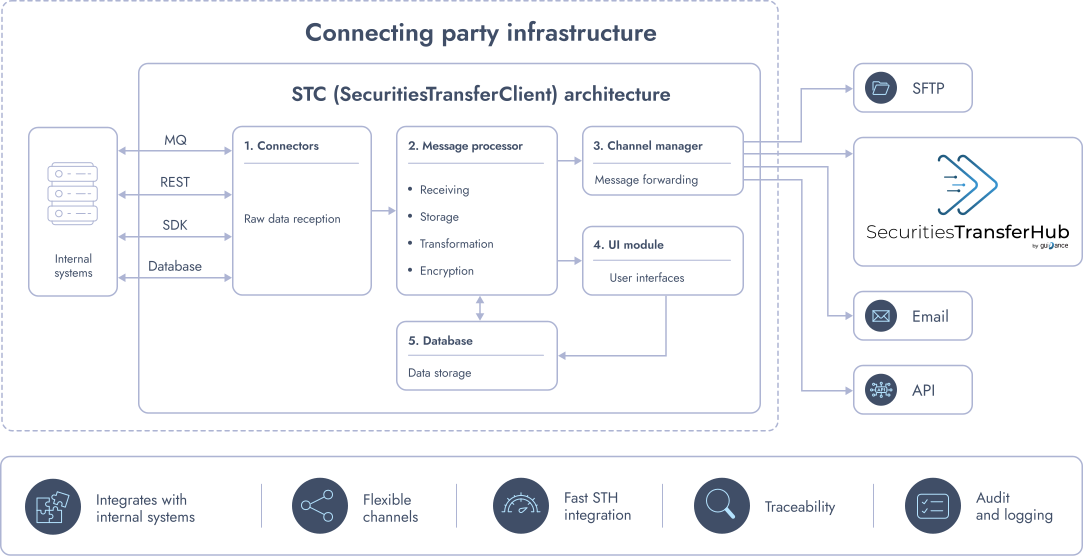
STC provides a single, controlled gateway to external systems, while supporting internal system integration via multiple standard interfaces.

  • A single connection point to the outside world
  • Containerized and modular operation
  • Modern technologies: Spring Boot, Angular, PostgreSQL
  • Secure and reliable operation
  • Ready-to-use out-of-the-box functionality
  • Customizable to specific requirements
  • No third-party license costs

Main modules

  • Connectors: connection to internal systems.
  • Message Processor: receiving, storing, transformation, validation, encryption and digital signing.
  • Channels: connection to STH and other external target systems.
  • Web interface: administration, message management, reporting and monitoring.
  • Database: storage of technical and business metadata.
Connectors for internal system integration

Connectors

Connection to internal systems

Standard internal integration

Connectors provide communication with internal systems and forward messages to the STC processing unit.

Out-of-the-box interfaces

  • MQ
  • Java SDK
  • REST API
  • Database

Custom integrations

Additional connectors can be implemented on request, for example for Kafka- or SOAP-based connections. Connectors are easy to configure and can be adapted to the customer's internal environment.

Without internal integration

Messages can be sent directly from the STC user interface, so the application can also be used without integration with an internal system.

Automated message processing

Message Processing

Validation, transformation, security and end-to-end process tracking

Receiving and storing messages

STC receives messages from internal systems, stores the information required for processing, and performs the transformations required by the target system.

Formats and transformation

  • XML
  • JSON
  • SWIFT MT51x

XML or JSON communication can be used with internal systems, while STC can perform conversion to and from the MT51x format when required.

Validation

  • Only messages with the specified format and content are processed.
  • Configurable permitted message types per partner.
  • Customizable content validation rules per partner.

Message workflows

  • ACK
  • NACK
  • Status management
  • Message lifecycle tracking

Security

  • Encryption
  • Digital signature
  • mTLS authentication
  • Certificate management

Monitoring and audit

  • Dashboard and reports.
  • Email alerts for important events.
  • Logs accessible via the user interface.
  • Comprehensive technical logs.
  • Audit functions.
External communication channels

Channels

Connection to STH and other external systems

External communication

Channels forward messages to target systems and receive messages from external partners.

Supported targets and protocols

  • STH – primary target system
  • SFTP
  • Email
  • Other APIs

STC is not limited to STH. Other service providers, partner systems or alternative communication channels can also be integrated when required.

Channel security

Channels also manage the necessary authentication, including mTLS and more.

STC user interface

STC User Interface

Clean, web-based and user-friendly operation
STC User Interface

General features

  • Web-based interface
  • Clean design
  • User-friendly UX
  • Hungarian and English languages
  • Additional languages can be added on request

Login and access control

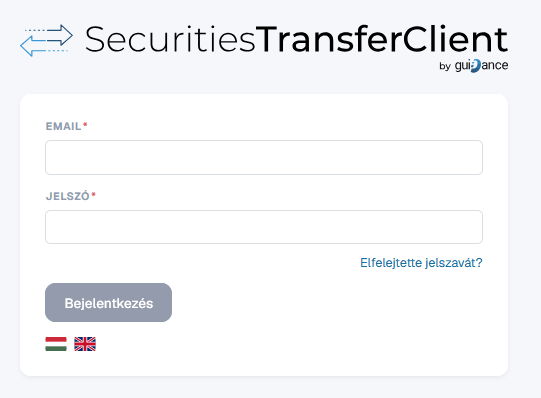
STC login interface

  • Built-in internal authentication or external LDAP integration.
  • SSO integration can be implemented.
  • Role-based access control.
  • Detailed standard logging, integrable with a centralized log management system.
  • Alerts for various events.

Administration

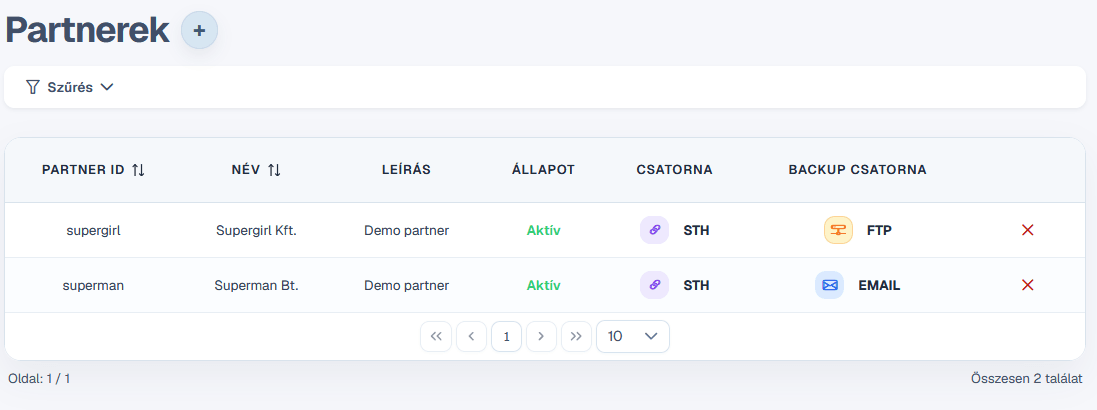
STC administration interface

  • Add and remove users
  • Configure roles
  • Manage partners
  • Manage primary and backup channels
  • Configure allowed message types
  • Channels paraméterezése

Message Log

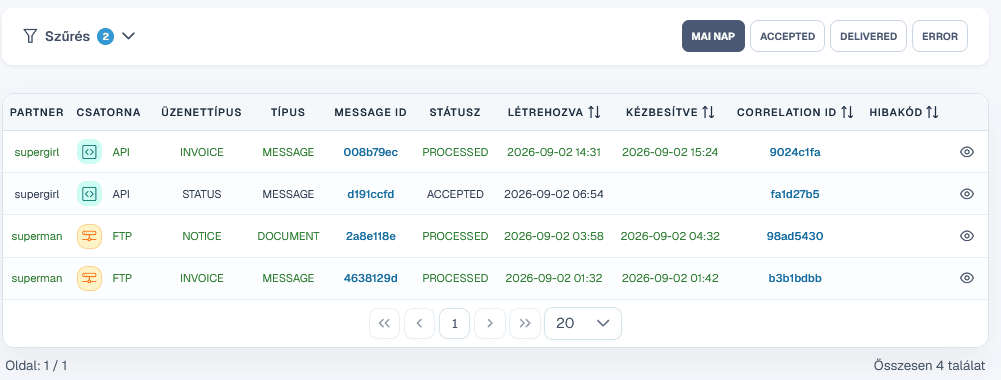
STC message log

  • List messages.
  • Quick filters: successful, failed and today's messages.
  • Clear listing of key information.

Message Details

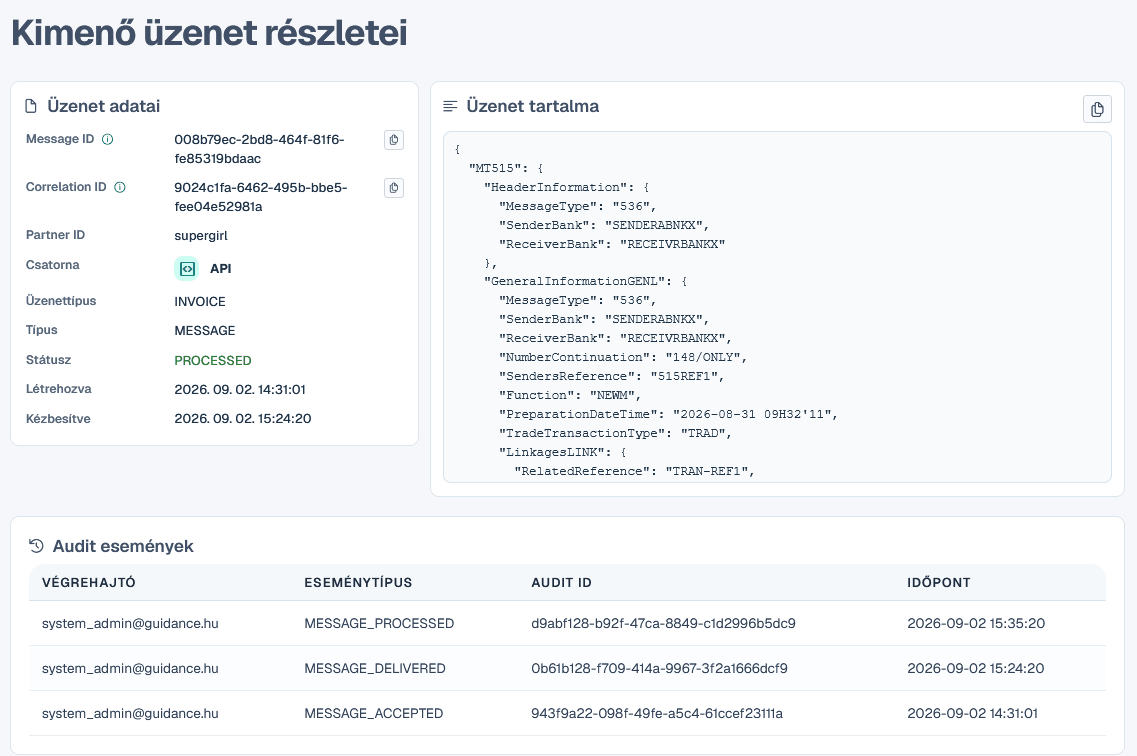
STC message details

  • The complete message content can be viewed.
  • Display in XML, JSON or MT51x format.
  • List message-related events: sending, receiving and acknowledgements.

Message Sending

STC message sending interface

  • Messages can be sent directly from the web interface.
  • The recipient can be selected.
  • The message can be pasted as text or loaded from a file.
  • Supported formats: XML, JSON, MT51x.
  • Automatic validation and transformation when required.
Business and IT benefits of STC

Benefits of STC

Simpler, more controlled operation from both IT and business perspectives

IT benefits

  • Easy and fast deployment
  • Support for standard interfaces
  • Standalone operation or tight integration
  • Secure use
  • Easy operation and maintenance
  • Comprehensive documentation
  • Support and maintenance
  • Operation in line with regulatory requirements

Business benefits

  • Support for T+1 operational requirements
  • Support for multiple connections and channels
  • A unified interface for all messages, regardless of channel
  • Full process control
  • Controlled message types and validated messages
  • Dashboards, reports, analytics and alerts
  • Sending messages without built-on integration
STC implementation

Deployment

The out-of-the-box version can be deployed within days

Fast start

Following contract signing, the fully functional out-of-the-box version can be deployed within days. Standard interfaces and ready-made STH integration significantly reduce internal development needs.

Customization

The standard functionality can be extended with custom connectors, additional channels, partner-specific validations and other integrations as required.

Demo

A demo version of STC will soon be available on our website.

Frequently asked questions

Questions and Answers

Frequently asked questions about using the STH Client

Can STH only be used with the STH Client?

No. STH can also be integrated directly, but STC makes the connection simpler and faster, while significantly reducing the required internal development time and cost.

Can the Client communicate only with STH?

No. STC can also be integrated with other service providers' systems and additional external target systems.

Can the Client also handle SFTP connections?

Yes. The message exchange process can also be implemented over an SFTP channel.

Can the Client be useful without an STH connection?

Yes. STC can also be used to connect to other service providers or partner systems.

Can the Client be deployed in any IT environment?

In practice, yes. In addition to standard interfaces, custom connectors can also be implemented, allowing STC to fit into most enterprise integration environments.

Can the Client validate messages?

Yes. Allowed message types and content validation rules can be defined separately for each partner.

When will the STH service be ready?

The STH service is already available and can be fully tested and used.

Can STC be tested?

Yes. A demo version will soon be published on our website.

How quickly can the Client be deployed?

Following contract signing, the fully functional out-of-the-box version can be deployed within days.

Is information available about pricing and subscription terms?

Yes. Further information about contractual and pricing terms related to STH and STC is available at info@sthservice.eu.

The STC presentation can be downloaded here.

Adopt out complete solution and keep your T+1 preparation on track for the 7 December 2026 readiness milestone.

Discuss your T+1 connectivity requirements with our team: